Understanding Campus Journal Edit Errors
Overview
All finance transaction require a chartfield string on the lines. The required chartfields are fund, source, account, and department. Additional chartfields are required for project-related transactions and department-specific activity.
For more information on chartfields, see the following:
- Chartfields webinar at http://ccinfo.unc.edu/training/webinars
- Chartfields Structure Quick Reference Guide at http://ccinfo.unc.edu/training/resource-documents
- Finding Your Chartfield Codes at http://ccinfo.unc.edu/training/training-videos/
The chartfields operate in combination with each other. In other words, certain chartfields are only allowed with certain others. When you enter and save a finance transaction in the system, you send it through the system edit process. The edit process checks your transaction for correct chartfield combinations.
Combination errors are referred to as "combo edit errors".
The table below lists the current possible combo edit errors. Additional combo edits may be added to the system after go-live, but you can always determine the nature of the error by the description of the error.
|
Combo Edit Error Code |
Explanation |
|---|---|
|
AFSD_IV |
This combo edit error code indicates that one of the required fields is blank. The required fields are Account, Fund, Source, and Department fields. |
|
AF_VI |
This combo edit error indicates that transactions with a State Revenue or any Expense account have been paired with a fund that does not have a purpose. Examples of funds without a purpose include 20100, 21100, and 21200. |
|
FAJ_VV |
This combo edit error indicates that an OSR |
|
FS_IV |
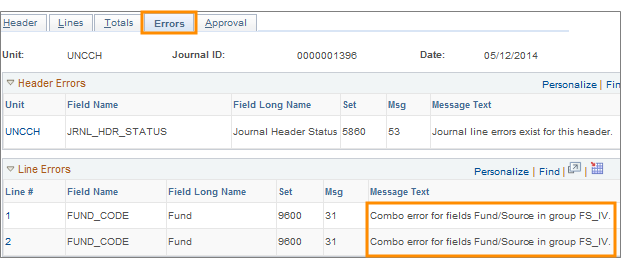
This combo edit error identifies that the fund and source combinations are invalid. |
|
AF_UNIT |
This combo edit error indicates that a foundation has used an invalid fund on a transaction. If the line business unit is a foundation business unit, such as CHBUS, then the fund can only be 29900, 29910, 29920, or 29930. |
|
FS_CHASF, FS_CHATH, and so on |
This combo edit error indicates that a foundation has used an invalid source. If the line business unit is a foundation business unit, such as CHBUS, then the source needs to be a source for that foundation. All foundation sources begin with a unique alpha prefix, such as B for business. |

After the system runs the edit process, the transaction page indicates the edit status. There are three possible edit statuses.
- V – Valid
- E – Error
- W – Warning
An E status indicates there is a combo edit error. Each transaction page contains an Errors tab that contains a description of the combo edit error.
Resolving the Error
When you get a combo edit error, you are responsible for fixing the error. After fixing the error, you must send the transaction back through the edit process until it passes with a status of V.